

To replace sim card in a DTU , the ONLY tool you need is a pen or something sharp like a pen. See following steps:
Turn off machine power.
Take DTU off from machine cabinate wall (Most of the case,the dtu should stick to the cabinate wall by velcro, no need to disconnect any cables or unscrew)
Hold DTU in hand and find the sim card holder next to the golden Antenna Connector. Use the pen to press the Release button (Little yellow button next to sim card holder, see picture below)
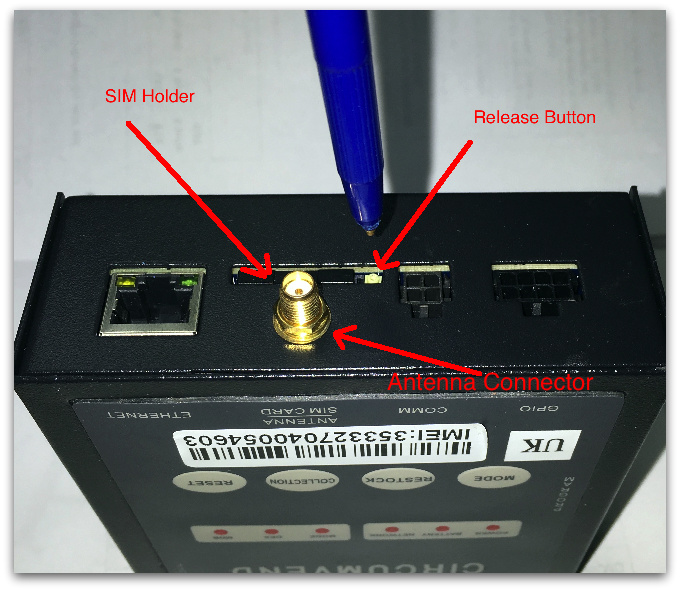
4. The SIM holder will then pop out, take the sim holder out (Remember the direction of the sim holder so that you can put it back later in the same way).
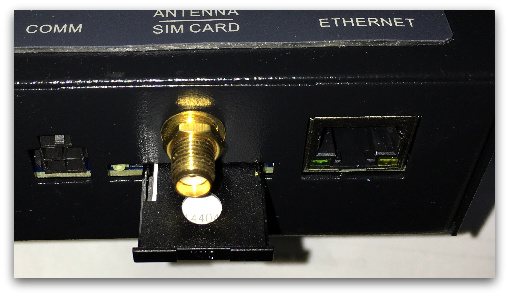
5. Replace the old sim card with a new one. Make sure the sim card PIN is facing out (Which means you can see the SIM PIN when sim card in the holder) and the CUT edge of the sim match the short corner of the holder.
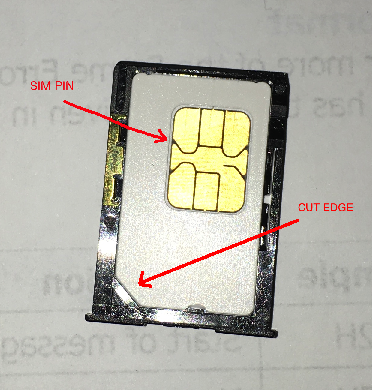
6. Put sim card holder back in. then turn on the machine power.
*NOTE: This instruction is based on our 2in1 Model DTU, other model is simlar.