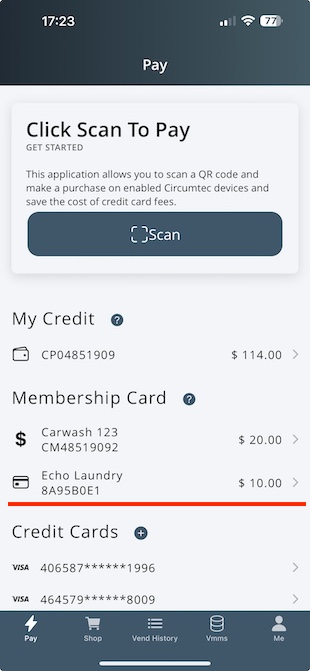

You may have already received a membership card or tag from a car wash or another service provider, which allows you to tap a card reader to receive service.
Now, you can link the card to CircumPay and enjoy the following benefits:
Top-up the card using the CircumPay app.
Use the card service number by scanning the QR code with CircumPay, eliminating the need to tap the physical card.
Step 1: Download CircumPay
Search for CircumPay in the Apple Store or Android Store to download the app.
If you already have the app installed, please skip this step.
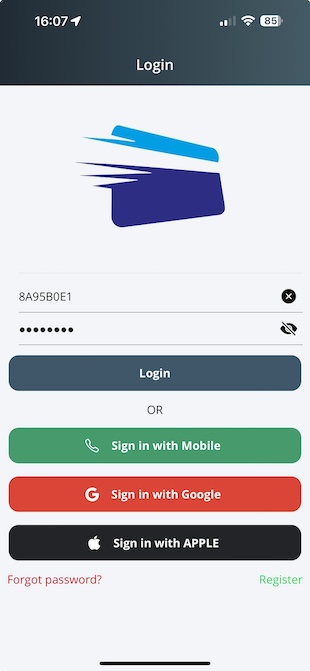
Step 2: Login with Card Number.
Open CircumPay and navigate to the login page. Enter the card number as the Account Name and Password, then click the Login button.
If you are already logged in, click on "Me" tab and select "Logout."
The card number is printed on your card or tag.
Step 3: Activate
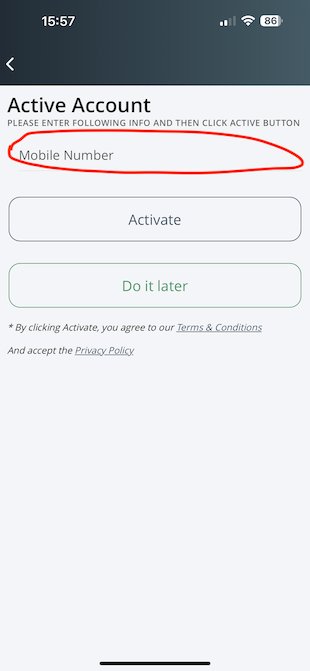
After logging in, you will see an Activation page.
1) Enter your mobile number and click the Activate button.
2) Enter the verification code you receive and click the Verify button.
3) Once verified, the card number will be displayed under Membership Cards group.