

Every time you refill your vending machine, you need to perform either Restock or Collection to let the VMMS server know that the machine has been restocked.
Both functions reset the Current Level of all coils back to their configured Par Level.
The difference is:
Restock – Resets the Current Level of all coils back to the Par Level.
Collection – Does the same as Restock, but also creates a Collection Report, which can be viewed under Collection → History Record.
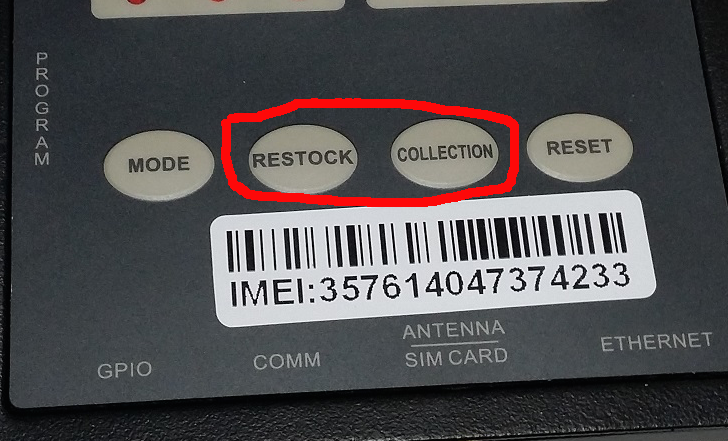
2-in-1 DTU
For a 2-in-1 DTU, the Restock and Collection buttons are available directly on the DTU screen.
After you have finished refilling the vending machine, press either Restock or Collection.
Other DTU Models
Other DTU models, such as PI, M5_LITE, IM25 and IM30, do not have Restock or Collection buttons on the device.
For these models, perform the same operation through VMMS:

System → Machine → click the machine IMEI → Restock / Collection
Select:
Restock to reset the Current Level of all coils to their Par Level.
Collection to reset the Current Level and also create a Collection Report.
The Collection Report can be viewed under:
Collection → History Record
Important: Always perform Restock or Collection after you have finished refilling the machine. Otherwise, the Current Level recorded in VMMS may not match the actual number of products in the machine.