

When customers use mobile payments, the following reasons might cause a failure:
1. Unsupported Payment Method
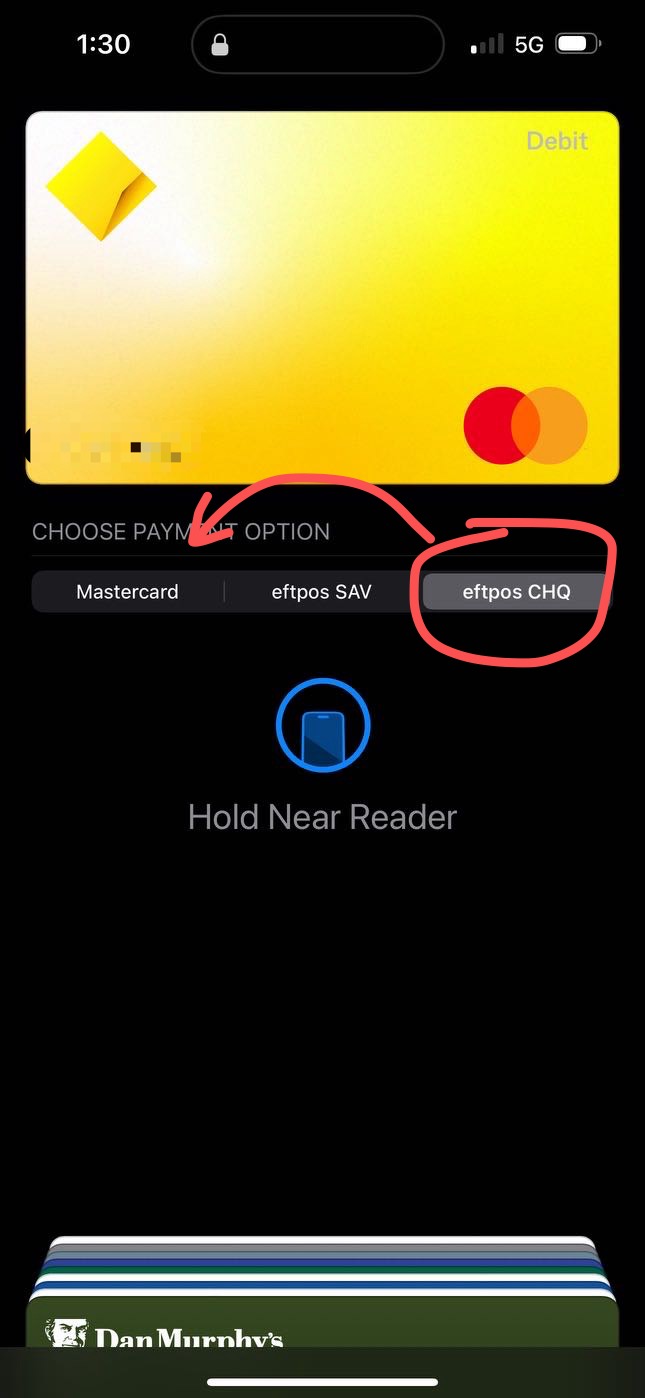
Circumtec's Pi and 2-in-1 black box currently do not support EFTPOS payments. Please ask the customer to open their mobile wallet, tap on the payment card, and check if EFTPOS is selected as the payment method. If so, please choose VISA or MASTERCARD instead.
2. Remove Phone Too Quickly After Beep
The card reader may take some time to read the card information on the mobile device. When the mobile phone is close to the card reader and you hear a beep, please wait patiently for an extra second to allow the card reader to fully read the card information before moving the phone away.
3. Phone Case Interference
The phone case may interfere with NFC signal. Thick or metal phone cases can sometimes block or interfere with NFC signals. If the card reader fails to detect the phone, try removing the case and attempt payment again.
4. Check the Phone NFV Settings
Ensure that the NFC function is enabled on the customer’s phone. Most mobile wallets rely on NFC to communicate with the card reader. You can usually find the NFC setting in the phone’s Settings > Connections (for Android) or under Wallet & Apple Pay (for iOS).