

1. What a Normal 4G Connection Looks Like
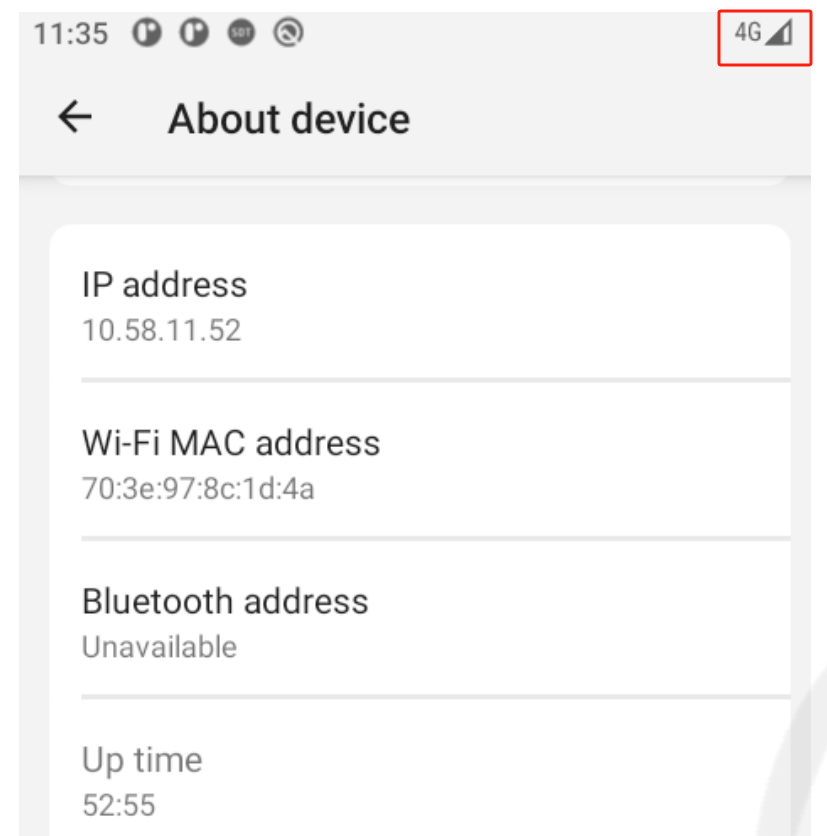
When the IM25 is connected to the mobile network correctly, you should see the following indicators in the top-right corner of the screen:
4G icon
SIM card triangle icon
Signal bars
If one or more of these indicators are missing, use the steps below to identify the issue.
2. Check the Baseband Version
The Baseband Version helps confirm whether the IM25 can detect its 4G communication module.
Step 1: Return to the PAX Reader Home Screen
Return to the PAX Reader home screen.
For instructions, refer to the following guide:
https://circumtec-11005.groovehq.com/help/how-to-return-your-pax-reader-to-the-home-screen
Step 2: Open Settings
Tap Settings.
Enter the password: pax9876@@
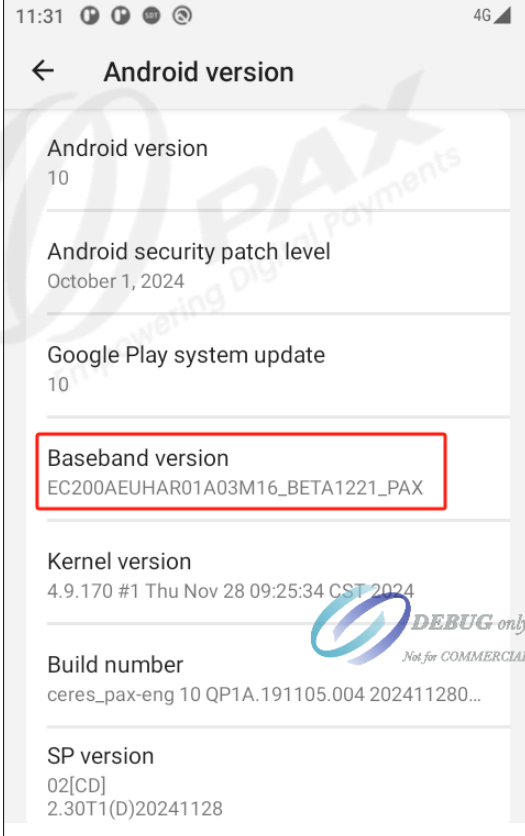
Step 3: Check the Baseband Version
Go to:
About device → Android version → Baseband version
If a Baseband Version is displayed, the IM25 is detecting the 4G module. Continue to Section 3 and compare the network indicators on your device.
If the Baseband Version is not displayed, refer to Issue A below.
3. Identify the 4G Connection Issue
Check for Network Indicators
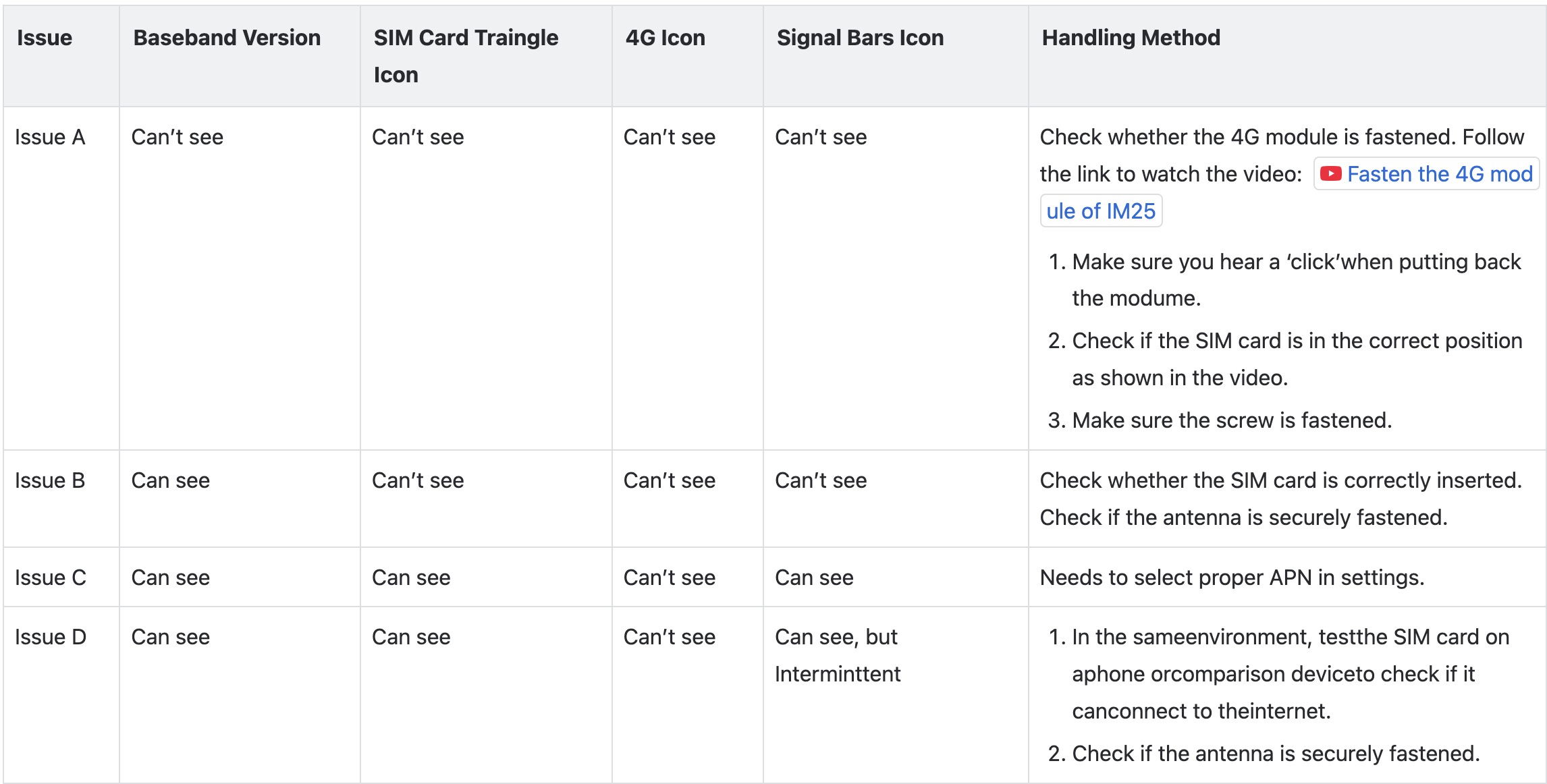
Compare the icons shown on your IM25 with the descriptions below.
Issue A — No Baseband Version or Network Icons
You may have Issue A if:
Baseband Version: Not displayed
SIM card triangle icon: Not displayed
4G icon: Not displayed
Signal bars: Not displayed
This usually means the 4G module needs to be checked and reinstalled correctly.
Watch the video showing how to remove and reinstall the 4G module: https://youtube.com/shorts/rfxvUVx_WOA?feature=share
When reinstalling the module:
Make sure you hear a click when the 4G module is inserted back into position.
Check that the SIM card is installed in the correct position, as shown in the video.
Make sure the screw is securely fastened.
After reinstalling the module, check the Baseband Version and network icons again.
Issue B — Baseband Version Is Visible, but No Network Icons Are Displayed
You may have Issue B if:
Baseband Version: Displayed
SIM card triangle icon: Not displayed
4G icon: Not displayed
Signal bars: Not displayed
Check the following:
Make sure the SIM card is inserted correctly.
Make sure the antenna is securely connected.
After checking the SIM card and antenna, check the network indicators again.
Issue C — SIM and Signal Are Available, but the 4G Icon Is Missing
You may have Issue C if:
Baseband Version: Displayed
SIM card triangle icon: Displayed
4G icon: Not displayed
Signal bars: Displayed
In this situation, the correct APN (Access Point Name) may need to be selected in the device settings.
Select the appropriate APN for the SIM card and mobile network being used, then check whether the 4G connection is restored.
Issue D — Signal Is Intermittent
You may have Issue D if:
Baseband Version: Displayed
SIM card triangle icon: Displayed
4G icon: Not displayed
Signal bars: Displayed, but intermittent
Try the following:
In the same location, test the SIM card in a mobile phone or another compatible device to confirm that the SIM card can connect to the internet.
Make sure the antenna is securely connected.
If the SIM card also has difficulty connecting in another device, the issue may be related to the SIM card or mobile network coverage.
4. Check the Connection Again
After completing the troubleshooting steps for your issue, check the top-right corner of the IM25 screen again.
A normal connection should show:
4G icon
SIM card triangle icon
Signal bars
If these indicators appear normally, the 4G connection has been restored.
5. Additional Support
If you have completed the troubleshooting steps above and the IM25 still cannot connect to 4G, please contact CircumTec Support for further assistance.